
Professional 3D animation and modeling solution
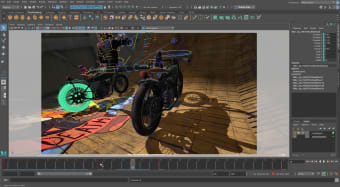
Autodesk Maya provides a versatile environment for designing detailed characters, engaging worlds, and cinematic-quality visual effects. Its animation, modeling, and simulation features are vital for professionals in film, gaming, and interactive media, offering precise control and creative flexibility. The software empowers users to execute complex projects while maintaining artistic accuracy and consistency across different tasks.
Equipped with advanced tools like rigging, dynamics, and rendering, Autodesk Maya supports both individual and team-based workflows. Its adaptable toolset ensures smooth performance even in large-scale productions, making it an essential solution for high-quality 3D content creation in professional settings.
Advanced tools for 3D content creation
Autodesk Maya provides robust animation, modeling, and simulation features that manage intricate character rigs and complex visual effects efficiently. Its rendering tools ensure professional-quality outputs, supporting both detailed projects and high-volume production. Alternatives like Blender or 3DS Max offer comparable functionality, yet this software remains a preferred choice for studios and creators requiring precision, reliability, and streamlined workflows that enhance productivity for teams and individual artists alike.
Collaboration is enhanced through cloud-integrated workflows and efficient asset management tools, enabling seamless teamwork across projects. Real-time updates support iterative design, ensuring changes are implemented smoothly and accurately. While some advanced plugins require separate licensing, the environment remains approachable for small studios and professionals alike, offering a comprehensive, reliable solution for animation production. Its balance of accessibility and robust functionality makes it ideal for varied creative workflows.
Its intuitive interface and responsive toolset let users concentrate on storytelling, scene composition, and character development without cumbersome setup. Despite relatively high system requirements, the software delivers stable, precise, and consistent performance across demanding projects. With capabilities in 3D modeling, rigging, and animation, it provides a dependable solution that few competitors match, combining robust functionality with smooth workflow integration for professional creators and studio environments.
Comprehensive solution for 3D professionals
Autodesk Maya is essential for studios and creators who need advanced animation, modeling, and simulation tools. Its complete feature set, reliable performance, and collaborative workflow support allow efficient production of high-quality content. For professionals prioritizing precision, creative control, and workflow efficiency, this software delivers robust capabilities that streamline complex 3D projects while maintaining consistent output across all production stages.


















.png)